Zscaler-Managed Dedicated IP is a Zscaler Internet Access (ZIA) feature that sends selected internet traffic out from IP addresses reserved exclusively for your organisation. Applications that only accept connections from allow-listed IPs see a fixed source address, while the traffic is still fully inspected by Zscaler. It also removes the need to host your own Source IP Anchoring (SIPA) infrastructure.
This guide covers how Dedicated IP works, what you need to get started, how to configure and test it in the ZIA Admin Portal, the Bring Your Own IP option, and how to migrate from SIPA without a hard cutover.
Why Does a Fixed Source IP Still Matter?
Many organisations now run a cloud-first security model built on Security Service Edge (SSE). That works well until a destination needs to see a known, fixed source IP address. Government portals, regulated SaaS platforms and partner systems often accept connections only from pre-approved addresses, and traffic leaving through Zscaler's shared egress IPs can't meet that requirement with the standard setup.
The usual answer has been Source IP Anchoring (SIPA). SIPA uses Zscaler Private Access (ZPA) to route traffic out through your own egress IP, but it means deploying and running additional virtual machines as ZPA App Connectors dedicated to SIPA.
Dedicated IP removes that extra infrastructure and the overhead of managing it. Selected traffic leaves from IP addresses reserved for your organisation, and it's still inspected by ZIA on the way out.
What Do You Need to Get Started?
The IP addresses are owned, hosted and provisioned by Zscaler, so there's nothing for you to deploy. You do need a Dedicated IP subscription, but this is included in Zscaler platform packaging, so many customers are already licensed for it.
To get your IPs provisioned and the feature enabled, a ticket needs to be raised with the Zscaler provisioning team. Your Zscaler account team can arrange this for you. If you want to apply Dedicated IP to specific users or groups, you'll also need the Advanced Cloud Firewall subscription (more on this below).
How Does Zscaler Dedicated IP Work?
Dedicated IP is controlled through ZIA Forwarding Control policy. You choose Dedicated IP as the forwarding method, then define which traffic it applies to. You can send all traffic through dedicated IPs, limit it to specific destinations, or apply it to particular users or groups. For example, a regulated SaaS app can use dedicated egress IPs while everything else carries on over shared IPs.
Matching traffic is processed by your configured ZIA engines and policies first. Zscaler then forwards it through IPs that are exclusive to your tenant, so the destination server sees your dedicated IP as the source.
Dedicated IPs are hosted in the Zscaler data centres you select, so you can choose an egress location that suits the destination.
Can You Bring Your Own IP Addresses (BYOIP)?
Yes. If you'd rather keep your current egress addresses, Zscaler supports using a customer-owned range for Dedicated IP. You keep ownership of an IPv4 prefix registered with your regional internet registry (RIR), and Zscaler advertises it from a chosen region and makes the addresses available as Dedicated IPs. If third parties already allow-list that range, you avoid having to ask them to update their access control lists (ACLs) at all.
Points to note:
• You must create a Route Origin Authorisation (ROA) in your registry that authorises the relevant Zscaler autonomous system number (ASN)
• The ROA must stay valid, or the route announcement can be withdrawn
• Zscaler-managed addresses remain available as an alternative
• Check the Zscaler documentation for current prefix size and region requirements
How to Configure and Test Zscaler Dedicated IP
Setup is quick. Here's the process from provisioning through to a working test:
Enable Dedicated IP. Ask your Zscaler account team to enable Dedicated IP and confirm the IPs are provisioned in your chosen data centres. Once provisioned, the addresses are listed under Infrastructure > Internet & SaaS > Dedicated IP > IP Addresses (see Figure 1).
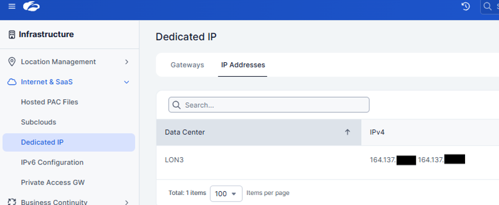
Figure 1: The IP Addresses tab under Dedicated IP, showing the addresses provisioned for each data centre (partly redacted).
Create a Dedicated IP gateway. In the ZIA Admin Portal, go to Infrastructure > Internet & SaaS > Dedicated IP > Gateways and click Add Gateway. Enter a name and description, then choose the data centre where the IP is hosted (see Figure 2).
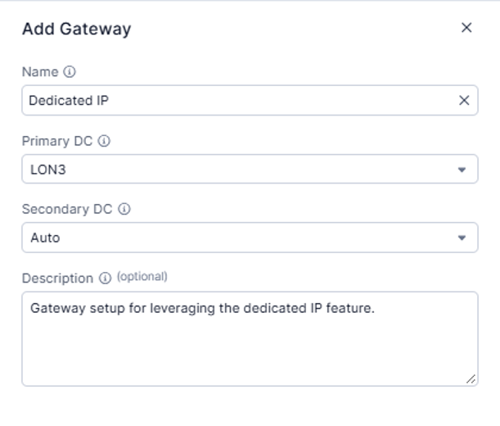
Figure 2: The Add Gateway dialog. The primary data centre is where the dedicated IP is hosted, and the secondary data centre is left on Auto.
Create a Forwarding Control rule. Go to Internet Access > Forwarding Control and click Add Rule in the top-right corner. Enter a name and description, set the Forwarding Method to Dedicated IP, then select your gateway under Forward to Gateway (see Figure 3).
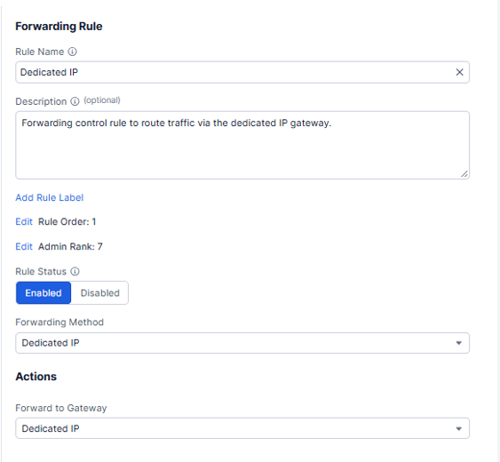
Figure 3: The Forwarding Rule settings. The forwarding method is Dedicated IP, the gateway from Figure 2 is selected, and the rule order is 1 so it is evaluated first.
Set narrow test criteria. Start with one test user and a GeoIP lookup service such as ipchicken.com as the destination. If you scope by destination, use a temporary destination group containing the GeoIP site (see Figure 4).
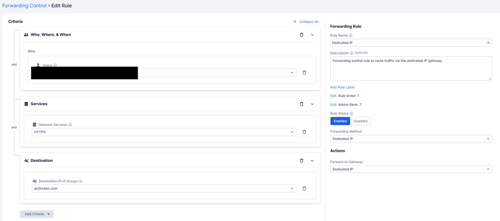
Figure 4: The test rule with one test user (redacted), the HTTPS service and the ipchicken.com destination group.
Check rule order. Make sure the Dedicated IP rule is evaluated before any broader rule that could match the same traffic.
Save and activate your changes. Use the activation menu in the top-right corner of the console (see Figure 5).
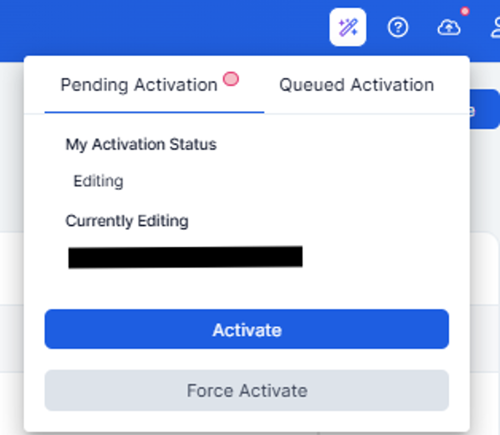
Figure 5: The activation menu in the top-right corner of the console (administrator name redacted).
Test the result. From a Zscaler-connected client that matches the rule criteria, browse to ipchicken.com or your preferred GeoIP service. The address shown should now be the dedicated IP provisioned for your organisation (Figure 1), not a shared Zscaler egress address. For a clear before-and-after, disable the rule and check the address again in a new incognito tab, then re-enable it and refresh to see the dedicated IP return (see Figure 6).
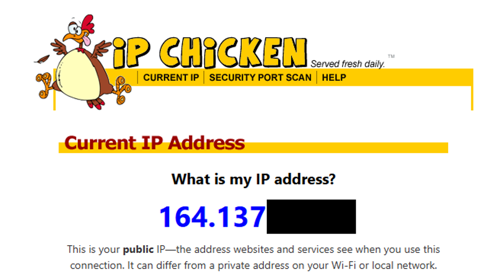
Figure 6: ipchicken.com showing the dedicated IP address once the rule is enabled (address partly redacted).
If the address doesn't change, check that the user and location match the rule criteria, that no higher rule is matching the traffic first, and that the client is forwarding web traffic to ZIA (visit http://ip.zscaler.com to confirm). Geolocation databases can lag behind new allocations, so give it a few refreshes and open a new incognito tab each time you change something.
Licensing note: User, group and department criteria in Forwarding Control rules require the Advanced Cloud Firewall subscription (see Figure 7). Confirm your licensing before you design the rule scope.
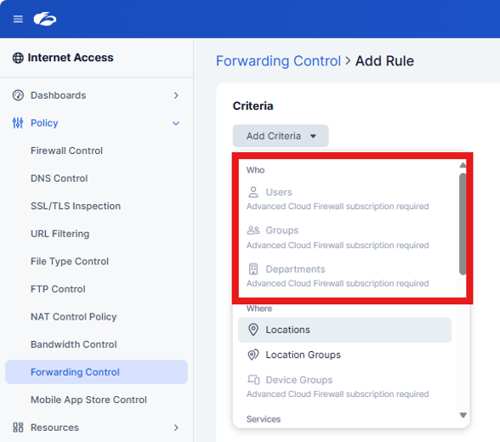
Figure 7: Users, Groups and Departments are greyed out in the Forwarding Control rule criteria without the Advanced Cloud Firewall subscription.
Once the test works, move to a small pilot group before widening the criteria. When the pilot is confirmed working, your initial setup is complete. To use the dedicated IP for more applications, create new destination groups for those applications and add them to the forwarding rule.
How Does Dedicated IP Replace Customer-Hosted SIPA?
Traditional SIPA requires you to deploy dedicated ZPA App Connectors in your own environment. Each one is a virtual machine to build, patch, monitor and pay for, and they're usually deployed in pairs for resilience.
Zscaler-managed Dedicated IP removes that requirement entirely. Zscaler provides and operates the dedicated IP addresses, while you keep control of the forwarding policy in the ZIA Admin Portal. Migration is mainly a change to the gateway and forwarding rule rather than an infrastructure project.
The slowest part is usually waiting for external organisations to add your new IPs to their ACLs. Running the new rules alongside SIPA (see below) takes the pressure off. Your existing setup keeps working while those requests are in progress, so there's no hard cutover date and each application can move as soon as the third party's ACL change lands.
How to Migrate from SIPA Safely: Run Both Side by Side
Forwarding Control rules are evaluated from the top down, and the first match wins. That makes a low-risk migration possible. Create the new Dedicated IP rule above your existing SIPA configuration and reference only the destinations you want to test. Your SIPA application segments stay in place, with their FQDNs and IPs untouched.
1. Create the Dedicated IP rule above the existing SIPA rules.
2. Test and validate each destination over the dedicated IP.
3. Widen the rule as each application is confirmed.
4. Once every application is validated over Dedicated IP, remove the old SIPA configuration and infrastructure.
If a test fails, disable the new rule and traffic falls back to the existing SIPA rule. Nothing is removed until you have proof the new configuration works.
Key Benefits of Zscaler-Managed Dedicated IP
• Lower overhead: no connector virtual machines to host, patch or monitor
• Fixed source IP: works with applications that only allow access from known addresses
• Selective use: apply it per destination, or per user and group with Advanced Cloud Firewall, and leave other traffic on shared IPs
• Security retained: traffic still passes through Zscaler threat and data protection inspection
• Central management: gateways and rules are managed in the ZIA Admin Portal
• Compliance support: helps meet regional access rules and gives you a consistent IP for audit and logging
Summary
Zscaler-Managed Dedicated IP gives you a fixed, Zscaler-provided source IP without the cost and effort of hosting your own connectors. For teams still running SIPA, it's a practical way to hand egress infrastructure to Zscaler while keeping inspection and policy control in the ZIA Admin Portal. A quick before-and-after check with a GeoIP service confirms it's working before you roll it out more widely.
As the only UK partner certified by Zscaler as a Solution Provider for Zero Trust Branch (ZTB), we help organisations get more from their Zscaler platform every day. If you're planning a move away from SIPA, or would like a second opinion on your Forwarding Control design, our team is always happy to talk it through.